


There has never been a stranger time to love recorded music. The major streaming platforms have never been more convenient, more algorithmically fluent, or more comprehensive — and yet the sense of unease around them has never been louder. Prices creep upward. Catalogs shift under your feet as licensing deals expire. “Your” library is a revocable lease. Ads multiply on the free tiers, and the paid tiers quietly fold in podcasts, audiobooks, and AI-generated filler that nobody asked for. For a growing cohort of listeners, the response has been to reach for something older and stranger: the idea that you might actually own your music, run your own server, and play it back with software you can read, fork, and trust.
That is the world open-source music players inhabit in 2026. It is not one market but several overlapping ones, held together by a shared ethos rather than a shared feature set. On one end you have polished desktop clients that talk to a self-hosted server humming away in a closet or a VPS. On the other you have scrappy aggregators that stitch together metadata from one place and audio from another, living squarely in a legal gray zone. In between sit the venerable local-library players that have quietly outlasted a dozen streaming fads, and a vibrant ecosystem of mobile apps for people whose music lives on their phone.
This is an opinionated tour of that landscape as it stands in 2026. The space moves fast — projects get archived, forked, renamed, and resurrected on a timescale of months, so treat every version number and status note here as a snapshot rather than gospel. But the broad shape is real, and it is worth understanding before you pick a horse.
Why Open-Source Playback, and Why Now
Before diving into individual apps, it is worth being honest about why anyone would bother. Commercial streaming is genuinely good at what it does. The open-source alternatives ask more of you. So what do you get in return?
Privacy. A self-hosted or local player does not phone home. It does not build a psychographic profile from your 2 a.m. listening habits, it does not feed a recommendation engine that also happens to sell ads, and it does not treat your library as training data. For many people this is the whole argument.
No ads, no upsells. Open-source players do not have a business model that depends on interrupting you. There is no free tier to degrade, no premium wall to dangle, no “we’ve added audiobooks to your plan” surprise.
Ownership and permanence. If you rip your CDs, buy lossless files from Bandcamp or Qobuz, or archive your own recordings, those files are yours. A server-plus-client setup means an album cannot vanish because a licensing deal collapsed. The catalog is exactly as large as your hard drive, and no larger — which is both the point and the price of admission.
Customization and control. Open-source players are endlessly tweakable: replaceable backends, custom themes, keyboard-driven workflows, gapless playback, ReplayGain, real equalizers, scrobbling to your service of choice. You can file a bug and see it fixed. You can fix it yourself.
Audiophile fidelity. Because these apps are built by and for enthusiasts, bit-perfect output, native DSD, exclusive-mode audio, and format-agnostic playback are table stakes rather than premium add-ons.
The trade-offs are equally real. You are the sysadmin now. Discovery is worse — there is no billion-song firehose and no algorithm that knows you better than you know yourself. Setup can be fiddly. And, as we will see, some corners of this world stay alive only by pulling audio from places that were never designed to hand it over, which raises questions worth taking seriously.
With that framing in place, let us break the landscape into its natural categories.
Category 1: Self-Hosted Server Clients
This is the beating heart of the modern open-source music scene, and it is where the most exciting work is happening. The pattern is simple and powerful: you run a server — most commonly Navidrome, Jellyfin, or something that speaks the Subsonic / OpenSubsonic API — that indexes your music files and exposes them over your network. Then you point one or more clients at it. The server handles the library, transcoding, and multi-user access; the client handles the listening experience. It is Spotify’s architecture, except you own both ends.
Feishin
If one app has come to symbolize this category, it is Feishin. Built by developer jeffvli, Feishin is explicitly a ground-up rewrite of the earlier, much-loved Sonixd player, and it has grown into arguably the most polished open-source desktop music client available. Its pitch is straightforward: the look and feel of a modern streaming app, pointed at your own server.
Feishin connects to Navidrome, Jellyfin, and any OpenSubsonic-compatible backend — a list that in practice includes Airsonic-Advanced, Ampache, Astiga, Funkwhale, Gonic, LMS, Nextcloud Music, Supysonic, and more. (Plex support has historically lived in community forks rather than the mainline app.) Under the hood it can use an MPV backend for serious, high-fidelity local playback, or a web player when you want something lighter. It ships as a desktop application for Windows, macOS, and Linux, and there is a self-hostable web/Docker option as well.
What makes Feishin special is the attention to detail: a genuinely attractive interface, playback scrobbling, synchronized lyrics, and thoughtful touches like smart-playlist editing for Navidrome users. As of mid-2026 the project remained actively maintained, with releases arriving through the year and a version somewhere in the 1.1x range being current when this was written — though given how quickly these things move, you should check the repository yourself rather than trust a number on a page. Reports of the project’s death have circulated periodically in self-hosting communities; at the time of writing they were exaggerated, but the broader lesson stands: in this world, always verify a project’s pulse before you commit to it.
Choose Feishin if: you run Navidrome, Jellyfin, or a Subsonic-family server and want the single best-looking desktop client to drive it.
Finamp
Where Feishin owns the desktop, Finamp owns the Jellyfin mobile experience. Finamp is an open-source music client built specifically for Jellyfin, available on both iOS and Android, and it has become the default recommendation for anyone who keeps their library on a Jellyfin server and wants to listen on the go — including offline, via robust download support.
Finamp has spent recent development cycles on a substantial redesign, distributed as a public beta (the 0.9.x-beta line) alongside the older stable branch. The redesign modernizes a UI that had grown a little utilitarian and leans into features like better offline handling, playback reporting, and a more expressive now-playing experience. Because it is laser-focused on Jellyfin rather than trying to speak every protocol, it tends to feel more native to that ecosystem than general-purpose clients do.
Choose Finamp if: Jellyfin is your music server and your primary listening device is a phone.
Tempo, Gonic clients, and the Subsonic mobile crowd
On Android, the Subsonic/OpenSubsonic ecosystem is rich. Tempo is a clean, open-source, natively-built Subsonic client distributed through F-Droid and beloved for being lightweight and unfussy. It targets the OpenSubsonic API, so it works with Navidrome, Gonic, Airsonic, and friends. It is a good example of the category’s quiet strength: no account, no ads, no telemetry — just a competent player pointed at your server.
Gonic itself deserves a mention as a server rather than a client — it is a lightweight, fast Subsonic-compatible music server written in Go, popular with people who find Navidrome heavier than they need. Any Subsonic client, Tempo included, can drive it.
The broader point is that because the Subsonic API is an open, well-understood standard, no single client is a lock-in. You can run Navidrome on the server and mix and match Feishin on the desktop, Tempo on Android, and something else entirely on iOS, all against the same library. That interoperability is one of the quiet superpowers of the self-hosted approach.
Symfonium (the notable closed exception)
No honest roundup of self-hosted clients can skip Symfonium, even though it does not actually belong in an open-source article — and that is precisely why it is worth discussing. Symfonium is a closed-source, paid Android app (a one-time purchase with a free trial, developed by Tolriq) that has earned a near-reverential reputation among self-hosters for the sheer breadth of what it connects to.
The list is staggering: local files, Plex, Emby, Jellyfin, Audiobookshelf, Subsonic/OpenSubsonic/Navidrome, Kodi, SMB and WebDAV shares, and a stack of cloud providers including Google Drive, OneDrive, Dropbox, Box, and pCloud. It supports Android Auto, Wear OS, and Android TV, and it is polished in a way that only sustained, funded development tends to produce.
Symfonium is the clearest evidence that “open-source” and “best in class” are not always the same thing. Its developer has been candid that the paid, closed model is what funds the ad-free, privacy-respecting, relentlessly-maintained result. Many people who care deeply about open source still pay for Symfonium and run it alongside their FOSS stack — a reminder that the values in this space (privacy, ownership, no ads) do not perfectly overlap with source availability, and that reasonable enthusiasts weigh them differently.
Choose Symfonium if: you want the most capable, best-supported Android client and you are willing to pay for closed software to get it.
Category 2: Streaming-Source Aggregators
Here the landscape gets more interesting — and more legally fraught. This category covers apps that do not assume you already own your music. Instead, they present a streaming-style front end, pull metadata (track names, album art, playlists) from one source, and fetch the actual audio from somewhere else entirely, typically free or ad-supported public sources. The engineering is clever. The legality is a genuine gray area, and it deserves a clear-eyed discussion rather than a wink.
Spotube
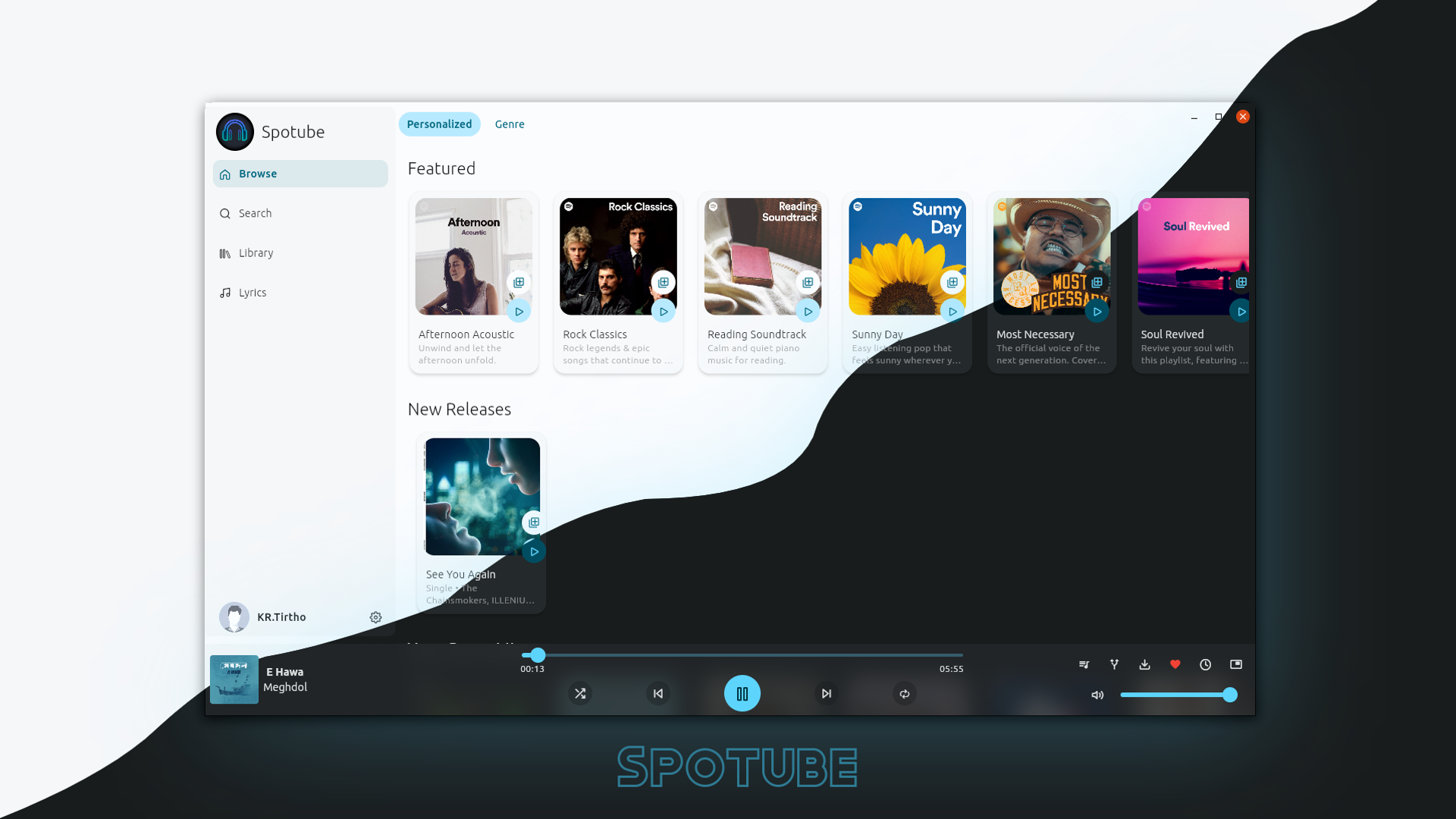
Spotube, created by KRTirtho, is the flagship of this category and one of the most-discussed open-source music apps of the past few years. Its original premise was audacious: use Spotify’s public catalog and metadata for browsing, discovery, and playlists, but stream the corresponding audio from other public sources — sidestepping the need for a Spotify Premium subscription and the ads of the free tier. It is written in Flutter, runs natively on Android, Windows, Linux, and macOS, ships with time-synced lyrics from public databases, playlist import and sync, and downloadable tracks with proper metadata tagging. It carries no telemetry and requires no premium subscription. It is developed in the open, with mirrors on GitHub and Codeberg and community funding through Open Collective.
The important 2026 wrinkle is architectural. Spotube’s original tight coupling to Spotify’s and YouTube’s APIs proved brittle — external API changes repeatedly broke the app, and depending on any single provider was a structural liability. In response, the project has moved toward a plugin architecture: rather than hardcoding one metadata source and one audio source, Spotube now lets the community supply metadata provider plugins and audio source plugins. In principle you “bring your own” catalog and playback backend. This makes the app more resilient and more clearly positions Spotube as a neutral player shell rather than specifically a Spotify workaround — though in practice the transition has been bumpy, with a steady stream of user reports about installing and connecting plugins. If you evaluate Spotube today, expect the plugin model rather than the old plug-and-play Spotify experience, and expect the details to keep shifting.
Choose Spotube if: you want a cross-platform, ad-free streaming-style player and you understand you are assembling metadata and audio sources yourself.
Nuclear
Nuclear (by nukeop) is Spotube’s spiritual cousin and one of the older projects in this space. It is an Electron desktop app that bills itself as a “streaming music player that finds free music for you,” aggregating audio from free and public sources — historically things like YouTube, SoundCloud, Jamendo, and other openly available catalogs — behind a unified, Spotify-like interface. It layers on lyrics, scrobbling, podcasts, and playlist management, and it is fully open source and cross-platform across Windows, macOS, and Linux.
Nuclear is best understood as a discovery-and-casual-listening tool rather than a library manager. It shines when you want to type an artist’s name and just hear something, without an account or a subscription. It is not going to replace a curated, owned collection, and it is at the mercy of whatever public sources it draws from.
The honest part: legal and ethical gray areas
It would be dishonest to present Spotube and Nuclear without addressing what they actually do. When an app pulls audio from a third-party public source to play a track whose rights holders expect to be paid through a different channel, it is operating in territory that ranges from “explicitly against a platform’s terms of service” to “legally untested” to “clearly infringing,” depending on the source, the jurisdiction, and exactly how the audio is obtained. Metadata (the fact that an album exists, its title, its cover art) sits on very different legal footing from the master recording itself.
I am not going to give you a playbook for circumventing paywalls or extracting streams, and neither of these projects should be understood as a license to do so. What is worth saying plainly is this: the software being open source does not resolve the content question. These tools exist in a gray zone that their own developers generally acknowledge, and the responsible framing is to use them with public-domain, Creative Commons, and legitimately free content, to support artists directly where you can (Bandcamp, direct purchases, merch, shows), and to understand that the convenience comes with an asterisk that a Navidrome-plus-Feishin setup simply does not have. The self-hosted category avoids all of this precisely because you supply your own, legitimately-obtained files.
Category 3: Local Library Players
Before servers and streaming, there were music players — programs that scanned a folder of files and let you play them beautifully. This category is the old growth forest of open-source audio: mature, stable, and still, for a great many people, the correct answer. If your music lives as files on your computer, you may not need a server or a streaming source at all.
Strawberry
Strawberry is the standout modern local-library player. It is a fork of the classic Clementine (which was itself a fork of the original Amarok 1.4), and it has become the go-to for people who want a serious, Qt-based, feature-dense desktop player. Strawberry is built for collectors: it handles enormous libraries gracefully, supports a wide range of formats including high-resolution and lossless audio, offers gapless playback, an equalizer, ReplayGain/EBU R128 normalization, CD ripping, cover-art management, and audio scrobbling. It runs on Linux, Windows, and macOS.
Crucially, Strawberry is not only a local player — it can also connect to subsonic-compatible servers and to some streaming services (Tidal, Qobuz, and others via their APIs), which makes it a versatile hub. But its soul is the local library, and it is arguably the best open-source expression of that idea in 2026. Clementine, by contrast, has seen much slower development in recent years, and Strawberry is where most of that lineage’s energy now lives.
Elisa
Elisa is KDE’s own music player, and it represents a different philosophy: simplicity and integration over maximal features. It is clean, modern, touch-friendly, and it fits naturally into a Plasma desktop, but it is deliberately not trying to be a power-user’s cockpit. For someone who wants an attractive, no-nonsense way to play a local collection without the density of Strawberry, Elisa is a lovely choice. It also supports basic streaming and Subsonic-style access, but it is at its best as an elegant local player.
Amarok, Clementine, and the ghosts
Amarok deserves acknowledgment as the ancestor of much of this family tree. The KDE project has periodically worked to revive it for modern Qt, and it carries enormous nostalgic weight, but in practical 2026 terms most listeners are better served by Strawberry (its most direct descendant) or Elisa. Clementine still exists and still works, but its slower pace makes Strawberry the recommendation for anyone starting fresh. This branch of the ecosystem is a good illustration of how open-source projects rarely die outright — they fork, and the energy migrates, and the old names live on in the DNA of the new ones.
Musikcube
For a completely different flavor, Musikcube is a cross-platform, terminal-based music player written in C++. It runs in a text console on Windows, macOS, Linux, and even BSD, offers keyboard-driven navigation, high-fidelity output, and a server/remote-control mode so you can stream your own library to other devices. It is a cult favorite among people who live in the terminal, and it is proof that “music player” and “graphical application” are not synonyms. If you want something fast, minimal, and SSH-friendly, Musikcube is a delight.
Category 4: Mobile-First and Platform-Specific Clients
The final category is a grab bag defined by platform and source rather than by architecture. These are the apps people actually reach for on their phones, and several of them tap into the big commercial catalogs in ways that raise the same gray-area questions as the aggregators.
InnerTune and the YouTube Music descendants
The YouTube Music ecosystem has spawned one of the liveliest corners of open-source Android development. InnerTune (originally by z-huang) is a Material 3-designed YouTube Music client for Android that presents YouTube’s enormous music catalog through a clean, ad-free, native interface with background playback, playlists, and downloads. It descends conceptually from the older, now-discontinued ViMusic, and it has in turn spawned its own family of forks — OuterTune (which adds local-file support alongside YouTube Music) and various others — as maintainers come and go and features fork off in different directions.
This sub-scene is a perfect microcosm of open-source music development: rapid iteration, a dizzying family tree of forks, and a constant churn of which project is “the active one” this quarter. It is also, again, a gray area — these clients present a commercial catalog through an interface its owner did not sanction. The FOSS packaging does not change the underlying content question, and the same “support artists directly” caveat applies.
YTMDesktop
On the desktop, YTMDesktop wraps the official YouTube Music web experience in a dedicated app with system integration, hotkeys, custom themes, scrobbling, and a companion API for controlling playback from other devices. Because it drives the official web player, it sits on firmer ground than the reverse-engineered clients — you are still using YouTube Music as intended, just in a nicer window. It is a good pick for someone who is already a YouTube Music subscriber and simply wants a proper native-feeling app.
Cider (the paid, closed Apple Music case)
Cider is the Apple Music equivalent of the YTMDesktop idea, and its evolution is instructive. The original Cider was, for a time, an open-source Apple Music client that gave Linux and Windows users a first-class way to use their Apple Music subscription outside Apple’s own walled ecosystem. Cider 2, however, is explicitly not open source — it ships under a proprietary license, the source is not publicly available, and it is sold as a paid app (a famously cheap one, distributed via Itch.io, the Microsoft Store, and donor builds) running on Windows, macOS, and Linux.
Two things matter here. First, Cider requires a legitimate Apple Music subscription — it is a client for a service you pay for, not a way around it, which is why it can operate openly where the aggregators cannot. Second, its journey from open to proprietary mirrors Symfonium’s story: sustained, high-quality development is expensive, and some of the best apps in this broader space have concluded that a paid, closed model is the only sustainable way to deliver it. If you are an Apple Music subscriber on a non-Apple platform, Cider is genuinely excellent — just go in knowing it is neither free nor open.
How to Choose
With four categories and dozens of apps, the paralysis is real. Here is a way to cut through it, framed as a series of honest questions.
Where does your music actually live? This is the first fork in the road. If you own files — ripped CDs, purchased downloads, personal recordings — you are in the self-hosted or local-library world, and you will never touch the legal gray areas. If you don’t own files and don’t want to, you are looking at either a legitimate commercial-catalog client (YTMDesktop, Cider) or an aggregator (Spotube, Nuclear), with all the caveats the latter carries.
Do you want to run a server? A server (Navidrome, Jellyfin, Gonic) unlocks the best of this ecosystem: multi-device sync, remote access, and the ability to mix clients freely. Feishin on the desktop plus Finamp or Tempo on mobile, all against one Navidrome instance, is close to the platonic ideal of an owned music setup. But it is real infrastructure. If you don’t want to be a sysadmin, a local player like Strawberry or Elisa on a single machine asks far less of you.
Which platform is primary? Feishin and Strawberry rule the desktop. Finamp, Tempo, Symfonium, and InnerTune define the Android experience (with Finamp also on iOS). Musikcube serves the terminal die-hards. Match the app to the device you actually use most.
How much do you value source availability versus polish? This is the uncomfortable one. The absolute best apps in a couple of categories — Symfonium for Android self-hosting, Cider for Apple Music — are closed and paid. If open source is a hard requirement, you will accept small compromises to honor it. If your real priorities are privacy, no ads, and ownership, you may find that paying a one-time fee for closed software is perfectly consistent with your values. There is no wrong answer, only an honest trade-off.
How stable do you need it to be? Remember the churn. Mature local players like Strawberry change slowly and reliably. Aggregators and reverse-engineered clients live and die by external APIs and can break — or migrate to a whole new architecture, as Spotube did — with little warning. If you want to set something up once and forget it, weight toward the stable, self-contained end of the spectrum.
Conclusion
The open-source music player landscape of 2026 is not a single thing, and its incoherence is its charm. It is a self-hosted movement that has produced desktop clients as beautiful as anything the streaming giants ship — Feishin being the clearest proof. It is a mobile ecosystem where a paid, closed app like Symfonium happily coexists with F-Droid darlings like Tempo, united by a shared refusal to serve you ads or harvest your data. It is a stubborn old-growth forest of local players — Strawberry, Elisa, Musikcube — that were quietly perfecting the craft of playing a file long before “streaming” was a verb. And it is a restless frontier of aggregators and catalog clients — Spotube, Nuclear, InnerTune, Cider — that push against the edges of what the commercial platforms permit, sometimes brilliantly and sometimes into genuinely murky territory.
If there is a single thread running through all of it, it is the idea that your relationship with your music should be something you control rather than something you rent. That control can look like a Navidrome server and a fleet of interchangeable clients. It can look like a folder of FLACs and a copy of Strawberry. It can even look like paying a developer directly for a closed app that respects you more than a free one would. What it does not look like is passively accepting whatever the algorithm, the price hike, or the expiring license deal hands you.
A closing caution, because this space demands it: everything above is a snapshot, and snapshots go stale fast here. Projects get archived and un-archived, forks overtake their parents, architectures get rewritten, and the “active” recommendation this month may be a footnote next year. Verify a project’s health before you invest in it, keep your own files backed up and portable, and treat the gray-area tools with both the curiosity and the caution they deserve — supporting the artists you love through channels that actually reach them. Do that, and the open-source music world will reward you with something the subscription services structurally cannot: a library that is genuinely, durably, unmistakably yours.
Sources consulted include the official project pages and repositories for Feishin, Spotube, Finamp, Nuclear, Strawberry, Symfonium, Cider, Tempo, Musikcube, and InnerTune, along with community discussions and coverage current as of mid-2026. Given the pace of change in this ecosystem, readers should verify current versions, maintenance status, and licensing directly with each project.